

Introduction
When I built our finance application on Tomcat, I quickly learned that putting Tomcat directly on the public Internet was not a good idea. It worked at first, but it was fragile, hard to secure, and almost impossible to maintain smoothly during deployments.
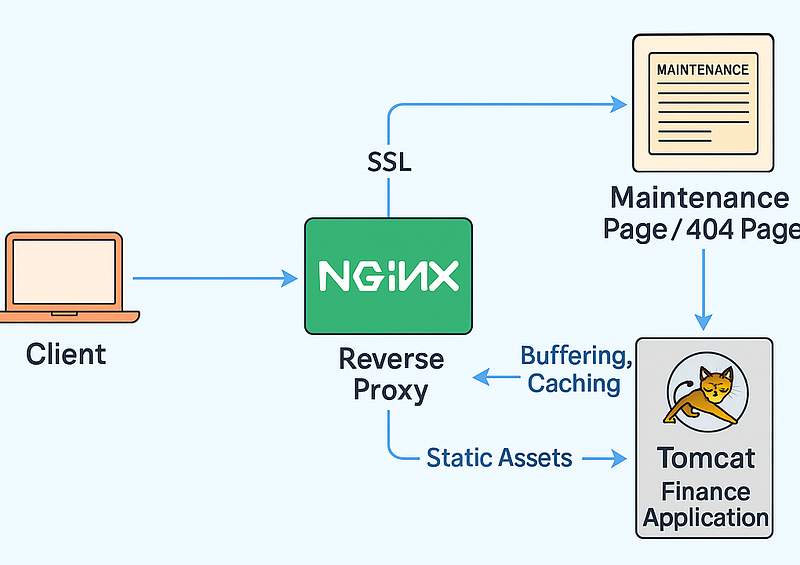
Eventually, I decided to place Nginx in front of Tomcat and let Nginx handle everything that Tomcat is not good at, especially SSL termination, maintenance mode, static file caching and hiding internal infrastructure details.
This article explains the exact setup that I use in production today. It is not a generic guide. It is specifically written for the finance system I deployed, and it includes real configurations and the reasoning behind each decision.
Why I Needed Nginx in Front of Tomcat
1. A clean maintenance page when Tomcat is restarting
In a finance system, we often have to restart Tomcat during deployments or maintenance. If Tomcat is down, the user should never see a raw Tomcat 503 page that exposes server information.
With Nginx, users always see a friendly maintenance page, even if Tomcat is completely offline. Nginx catches the 502 or 503 response and serves a static HTML page that I prepared.
2. SSL is much easier on Nginx
Configuring SSL inside Tomcat is unnecessarily complicated. You have to convert certificates into a Java keystore, manage the connector and deal with multiple formats.
With Nginx, SSL is simple. I only need two files, a certificate and a private key. Nginx terminates HTTPS, and Tomcat only receives plain HTTP from localhost. Certificate renewal and debugging are also easier.
3. Tomcat is completely hidden from the outside world
For security reasons, I do not want Tomcat to expose its ports or server information to public users. Tomcat only listens on 127.0.0.1:8080.
If someone tries to scan my server, they cannot detect that Tomcat exists at all.
4. Large headers for finance approvals
Some approval operations in the system send a long list of finance application IDs in the header or query string.
To support these large headers, I configured Nginx to allow bigger header buffers. Without this, some requests would fail because the default header size is too small.
5. Large file uploads
Users upload contracts, invoices and scanned documents. I set a clean upload size limit in Nginx so that large files do not even reach Tomcat unless they pass Nginx validation first.
6. Faster static content (CSS, JS, icons)
Even though Tomcat can serve static files, Nginx is much faster. I enabled caching for static assets so Nginx serves them directly without bothering Tomcat.
7. Custom timeouts for long-running operations
Some processes in a finance system take longer, such as report generation or batch approval.
Nginx gives me full control over proxy timeouts so users do not receive unexpected 504 errors.
The Nginx HTTPS Configuration I Use
I keep this file at:
/etc/nginx/sites-available/myapp_httpsHere is the actual configuration, simplified for the article but still accurate.
server {
    listen 443 ssl;
    server_name finance.example.com;

    ssl_certificate     /opt/myapp/keystore/app.crt;
    ssl_certificate_key /opt/myapp/keystore/app.key;

    ssl_session_cache shared:SSL:1m;
    ssl_session_timeout 5m;
    ssl_ciphers HIGH:!aNULL:!MD5;
    ssl_protocols TLSv1.2;
    ssl_prefer_server_ciphers on;

    large_client_header_buffers 4 65k;
    client_max_body_size 100m;

    error_page 502 503 = @maintenance;
    error_page 404 = @errors;

    access_log /opt/myapp/nginx/logs/access.log;
    error_log  /opt/myapp/nginx/logs/error.log;

    location / {
        proxy_set_header Host                $host;
        proxy_set_header X-Forwarded-Host    $host;
        proxy_set_header X-Forwarded-Server  $host;
        proxy_set_header X-Forwarded-For     $proxy_add_x_forwarded_for;
        proxy_set_header X-Forwarded-Proto   https;

        proxy_pass http://127.0.0.1:8080;

        proxy_buffering off;
        proxy_buffer_size 128k;
        proxy_buffers 100 128k;

        proxy_connect_timeout 180;
        proxy_send_timeout    180;
        proxy_read_timeout    180;
        send_timeout          180;

        location ~* \.(css|js|jpg|gif|ico)$ {
            proxy_cache cache;
            proxy_cache_key   $host$uri$is_args$args;
            proxy_cache_valid 200 301 302 30m;
            expires 30m;
            proxy_pass http://127.0.0.1:8080;
        }
    }

    location = / {
        return 301 /myapp/;
    }

    location @maintenance {
        root /opt/myapp/nginx/www;
        rewrite ^ /maintenance.html break;
    }

    location @errors {
        root /opt/myapp/nginx/www;
        rewrite ^ /404.html break;
    }
}
This is the core of the system. Nginx handles SSL, forwards traffic to Tomcat, serves the maintenance page when Tomcat is offline, caches static content and protects the internal network layout.
HTTP Redirect (Port 80)
I added a simple configuration that redirects all HTTP traffic to HTTPS.
/etc/nginx/sites-available/myapp_httpserver {
listen 80;
server_name finance.example.com;
return 301 https://$host$request_uri;
}Folder Structure
I keep Nginx related files inside a dedicated application folder:
/opt/myapp/
    keystore/
    nginx/
        logs/
        www/
This makes it easy to manage certificates, logs and static pages.
Tomcat Configuration That Completes the Setup
Inside Tomcat’s server.xml, I bind Tomcat to localhost so it cannot be accessed from outside.
<Connector port="8080"
           address="127.0.0.1"
           maxHttpHeaderSize="65536"
           protocol="HTTP/1.1"
           connectionTimeout="20000"
           maxThreads="150"/>
I also make Tomcat understand the real client IP and protocol:
<Valve className="org.apache.catalina.valves.RemoteIpValve"
       remoteIpHeader="X-Forwarded-For"
       protocolHeader="X-Forwarded-Proto"
       protocolHeaderHttpsValue="https"/>
This ensures the system logs the correct client IP and behaves correctly for HTTPS.
Why This Setup Works Well for a Finance System
Putting Nginx in front of Tomcat has made the entire system feel far more professional and stable. During deployments or restarts, users never run into the typical Tomcat 503 pages. Instead, they always see a clean maintenance screen, which makes the system look reliable even when work is happening behind the scenes.
Handling SSL on Nginx also simplifies everything. Certificates are easier to manage, renew, and debug, and Tomcat no longer has to deal with HTTPS directly. Another benefit is security. Since Tomcat only listens on localhost, it is completely hidden from outside traffic, which eliminates an entire category of scanning and probing attempts.
Performance improves as well. Static files such as CSS and JavaScript load faster because Nginx can cache them, and uploads are checked and limited before they ever reach Tomcat. Some of our financial operations involve large headers or long-running actions, and Nginx gives me full control over buffer sizes and timeouts, which makes these operations run smoothly without random errors.
Even in cases where Tomcat goes offline for a moment, the site still responds predictably thanks to the maintenance page. Over the years, this setup has proven extremely solid. It has helped the finance application achieve near-zero downtime across many releases and infrastructure changes, and it continues to handle production traffic without surprises.