


Ask an AI assistant for a to-do app, a web scraper or a sorting function and you get working code in seconds. So a fair question for anyone starting out is: why learn programming at all if AI can write the code?
Short answer: AI changed how code gets written, not who is responsible for it. Someone still has to decide what the program should do, check that the code really does it, and fix it when it breaks. Those are programming skills, and AI makes the people who have them faster, not unnecessary.
1. AI writes code, but someone has to know if it is right
AI models produce code that looks right. Most of the time it is, which is exactly why the mistakes are easy to miss. Here is a typical answer to "write a Python function that returns the average of a list":
def average(nums):
    return sum(nums) / len(nums)

print(average([72, 88, 95, 64]))  # 79.75
print(average([]))                # ZeroDivisionError: division by zero
It works on the example, and it crashes the first time a student has no scores yet. Spotting that takes ten seconds if you can read Python, and is impossible if you can't. Fixing it also needs a decision that only you can make: should an empty list return 0, return nothing, or raise an error? That depends on your app, not on the code.
def average(nums):
    if not nums:
        return None  # no scores yet: the caller decides what to show
    return sum(nums) / len(nums)
Paste both versions into the online Python compiler and run them: seeing the error yourself is the fastest way to understand why reading code matters.
2. Most programming is reading, testing and fixing
Writing new lines was never the slowest part of software work. Most of the time goes into understanding existing code, finding out why something fails and changing it without breaking something else. AI speeds up the typing; it does not remove the other steps. The workflow now looks like this:
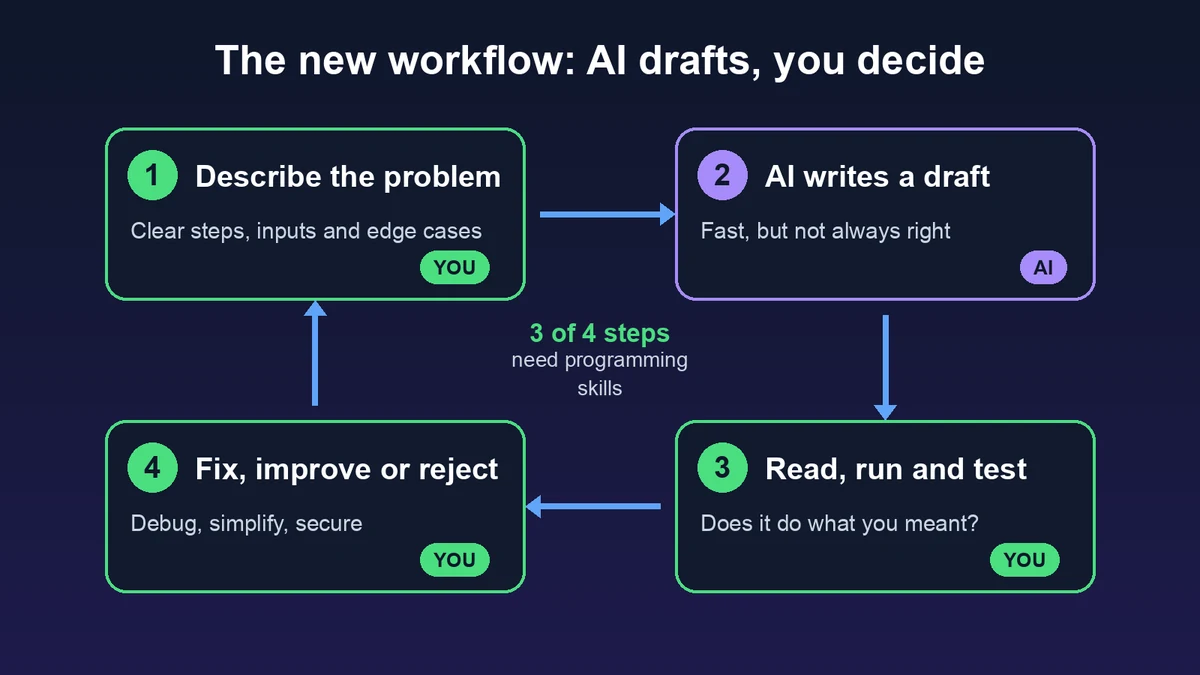
Three of the four steps need you to understand code. If you skip them, you are not programming with AI; you are hoping.
3. Programming is problem solving, and prompts are specifications
The hard part of programming is turning a fuzzy goal into exact steps: what are the inputs, what happens at the edges, what counts as done. A prompt is a specification written in plain language, and a vague specification gets vague code. People who have learned to program write better prompts because they already think in steps, data and edge cases.
Compare "make a login page" with "a login form that rate-limits to 5 failed attempts per minute, stores passwords with bcrypt and shows the same error for a wrong email or a wrong password". The second prompt comes from someone who knows what can go wrong.
4. Security, privacy and cost are your responsibility
AI-generated code often works in a demo and fails in production in ways you can't see by clicking around. A classic example is building SQL from user input:
# Works in a demo, but a name like  ' OR '1'='1  returns every user
query = f"SELECT * FROM users WHERE name = '{name}'"
cursor.execute(query)
The safe version is just as short, but you have to know why it matters to ask for it or to notice it is missing:
# The driver sends the value separately, so it is never run as SQL
cursor.execute("SELECT * FROM users WHERE name = %s", (name,))
The same goes for leaked API keys, code that loads a whole table into memory, or an O(n²) loop that is fine with 100 rows and too slow with a million. When something goes wrong, "the AI wrote it" is not an answer anyone will accept.
5. AI multiplies what you already know
AI is an amplifier. A beginner with AI can build a small demo. A developer with AI can build, debug and ship a real product much faster than before. The gap between the two grows, it does not shrink.
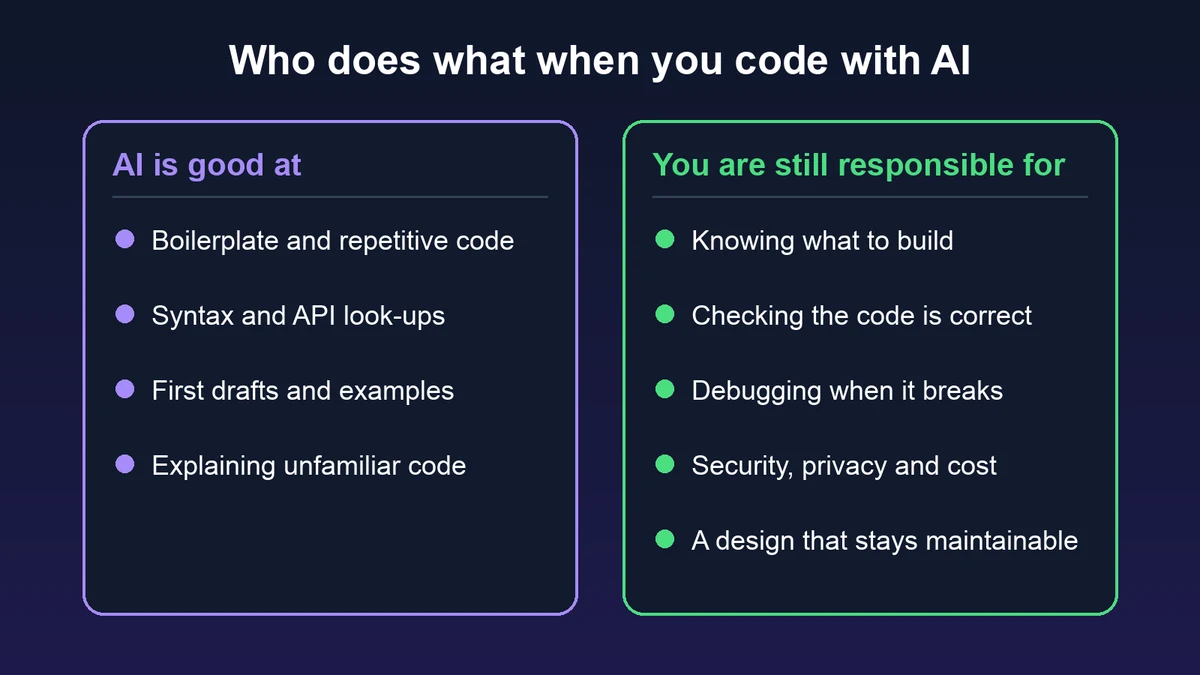
Without fundamentals you are stuck at whatever the AI gets right on the first try. As soon as the project grows past a few files, or the AI keeps "fixing" a bug by creating a new one, you need to understand the code to move forward.
6. What about jobs?
The work is changing: less time on boilerplate, more on design, review, testing and connecting systems. Teams expect developers to use AI tools well, and using them well means judging their output. The skills that are hardest to automate are the ones beginners sometimes want to skip: debugging, reading other people's code and explaining why a design is right.
Programming is also useful far outside software jobs. Analysts, scientists, teachers, marketers and engineers who can write a small script, read the code an AI gives them and check the result get far more out of AI than those who can't.
What to learn now
The basics have not changed much, but the priorities have. Focus on the things that let you direct and check AI:
| Skill | Why it matters with AI |
|---|---|
| Variables, conditions, loops, functions | You need them to read any code an AI writes |
| Data structures (lists, dictionaries, sets) | Choosing the right one is a design decision AI often gets wrong |
| Reading code and error messages | Most of your time will go into reviewing code, not typing it |
| Debugging | AI can suggest fixes; you have to find the real cause |
| Testing | Tests are how you prove AI code does what you meant |
| Git | Lets you try AI changes safely and undo them |
| How the web, databases and APIs work | Most real apps connect these, and that is where many bugs hide |
| Security basics | Input validation, secrets and permissions are not optional |
How to learn programming with AI (without cheating yourself)
AI can be the best tutor you ever had, or a way to finish exercises without learning anything. The difference is how you use it:
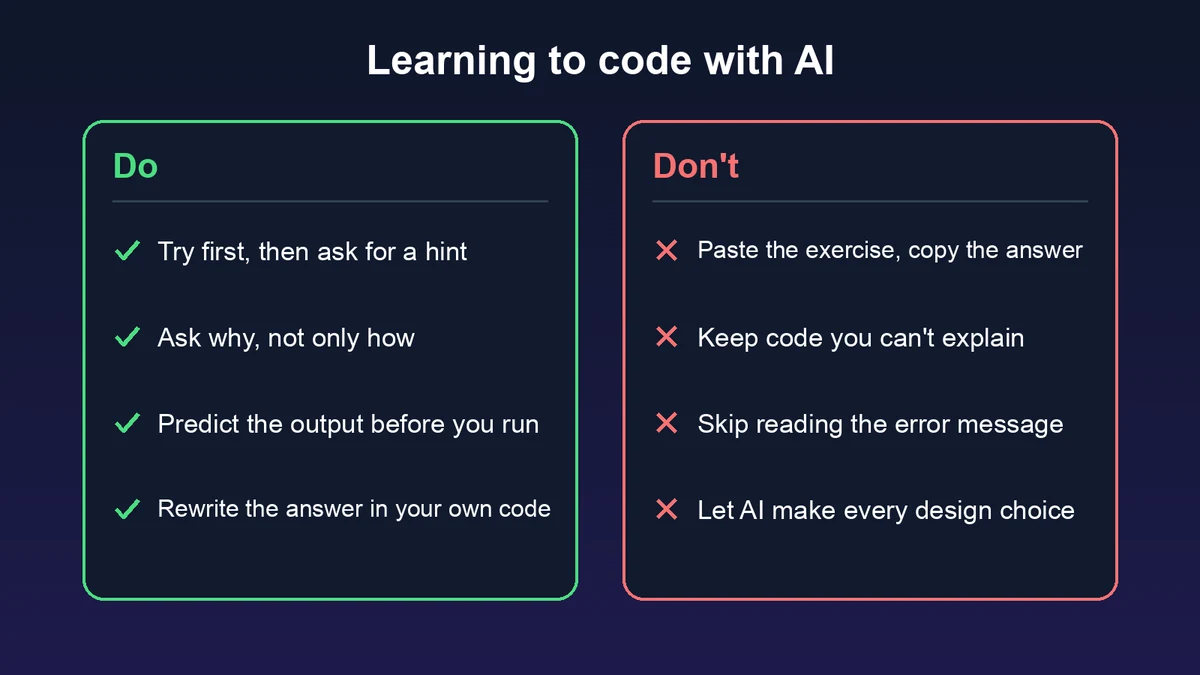
- Try first, then ask. Spend ten minutes on a problem before asking AI. Ask for a hint, not the full solution.
- Ask why. "Why does this loop start at 1?" teaches more than "fix my loop".
- Predict before you run. Guess the output, then run the code. Every wrong guess shows you a gap.
- Retype and change the code. Copying teaches nothing. Retype the answer, then change it: a different input, an extra feature, a bug on purpose.
- Read the error message first. Most errors tell you the file, the line and the reason. Learning to read them is a skill AI can't practice for you.
You can practice all of this in the browser: write and run code in the online Python compiler, then test yourself with coding challenges that check your solution automatically, or follow a learning path from the basics.
FAQ
Will AI replace programmers?
AI replaces some programming tasks, especially repetitive ones. It does not replace the job of deciding what to build, checking that it works and taking responsibility for it. Programmers who use AI well will replace programmers who don't.
Is it too late to start learning programming?
No. Getting started is easier than ever, because AI can explain any line you don't understand. What matters is that you learn to understand the code, not only to produce it.
Which programming language should I learn first?
Python is the most common first choice: its syntax is easy to read, and it is used for automation, data and AI. JavaScript is a good choice if you want to build websites. The concepts you learn carry over to every other language.
Can I learn programming only with AI?
You can, if you use AI as a tutor: ask for explanations and hints, write the code yourself and check your work with exercises. If you only copy answers, you will finish faster and know nothing at the end.